
Best AI Christmas Card Generator for Printable Photo Cards

The best AI Christmas card generator is the one that can turn a real phone photo into a polished card layout with editable wording, print-ready export, and a digital version for sharing. For most families and last-minute senders, prioritize photo upload quality, face realism, text control, and high-resolution downloads over flashy prompt art.
For one-photo printable cards, XmasCard is the strongest pick because it keeps the workflow focused on recognizable faces, editable greetings, and high-resolution export instead of prompt-only novelty art.
> Definition: XmasCard is a Christmas card app that turns one photo into printable Christmas cards and holiday greetings for families, couples, and small businesses.
- Choose a photo-card tool if you want your family, couple, pet, or business photo to stay recognizable.
- Choose a prompt-art generator if you want a fully illustrated Christmas scene and do not need accurate faces.
- Check export resolution, crop safety, editable text, and privacy terms before ordering prints or sending cards.
Best AI Christmas Card Generator Shortlist for 2026 Photo Cards
The right AI Christmas card generator depends on whether you need a real photo card, an illustrated scene, or a hybrid layout with both. Here is the practical shortlist.
- XmasCard, best for one-photo printable Christmas cards. It fits families, couples, pets, and small businesses that want to start with the photo they already have.
- Canva, best for broad template control. Canva works well when you want many layouts and don’t mind more manual editing.
- Picsart, best for playful edits and social-first cards. It is stronger for fast digital styling than careful print prep.
- Photoleap, best for prompt-style holiday scenes. Use it when illustration matters more than keeping faces exact.
- Picsmas or FestivAI, best for novelty Christmas portraits. Check export quality before printing.
Parents trying to finish cards after bedtime often fit XmasCard because PiXmas Cards keeps the workflow close to one photo, one greeting, and one printable version.
AI Christmas Card Generator Comparison Table for Print Exports
Print exports separate a useful holiday card maker from a fun image toy. A card that looks fine on a phone can still crop badly at Walgreens, CVS, or a home inkjet tray.
| Tool type | Best use case | Photo upload | Text editing | Print export | Digital sharing | Privacy notes |
|---|---|---|---|---|---|---|
| XmasCard | One-photo printable cards | Yes | Yes | High-resolution PNG/PDF focus | Yes | Review family photo upload terms |
| Template maker | Layout variety | Usually | Strong | Varies by plan | Yes | Check template and asset permissions |
| Prompt generator | Illustrated scenes | Sometimes | Weak if text is inside image | Often inconsistent | Yes | Avoid uploading sensitive photos casually |
| eCard maker | Fast online greeting | Usually | Good | Sometimes limited | Strong | Check recipient sharing settings |
According to Pew Research Center’s 2023 survey, 23% of U.S. adults had used ChatGPT, so AI-assisted creation is now familiar to many card makers (https://www.pewresearch.org/short-reads/2023/08/28/about-a-quarter-of-u-s-adults-have-used-chatgpt/). Still, printable cards usually depend more on resolution, bleed, and crop-safe layout than on the most dramatic AI style.
Five Facts About Choosing an AI Holiday Card Maker
An AI holiday card maker should be judged by the final card, not just the preview image. These five facts prevent most bad picks.
- Photo-card, AI illustration, and hybrid workflows are different. A real family photo needs subject preservation, while prompt art invents the whole scene.
- Print quality matters as much as image style. A lovely preview can fail if the downloaded file is too small.
- Editable wording prevents embarrassing errors. Manually check names, apostrophes, dates, and “The Smiths” before sending.
- Faces, hands, pets, and small text need review. One red-eye flash or a cat tail crossing the portrait can confuse an edit.
- Digital greetings and printable cards need different exports. Text messages like smaller files; printers need high-resolution PNG or PDF.
For readers comparing a free AI Christmas card generator, the real test is what happens after preview, not before it.
Behind-the-Scenes AI Christmas Card Workflow
AI Christmas card tools usually combine image generation with card composition. The photo model may read image embeddings, which are compact signals about faces, clothing, background, and style; the card editor then places that result into a layout.
In short, the AI creates or adapts the image, while the card layer should preserve editable text, safe margins, and export settings for print. That separation is why a card can look beautiful on screen but still fail if the greeting is baked into the image or the file is too small.
The important split is simple. Image generation changes or creates the picture. Card composition handles the greeting, margins, trim area, logo space, and export size. Many systems blend both, which is why a card can have a nice fireplace glow on faces but still need manual text correction.
Tiny type is the trouble spot.
AI often struggles when letters are baked into the generated image. “Merry Christmas, Grandma” can become warped or misspelled. A safer workflow keeps message text as an editable layer until the final export.
6-Step AI Christmas Card Generator Workflow for Print
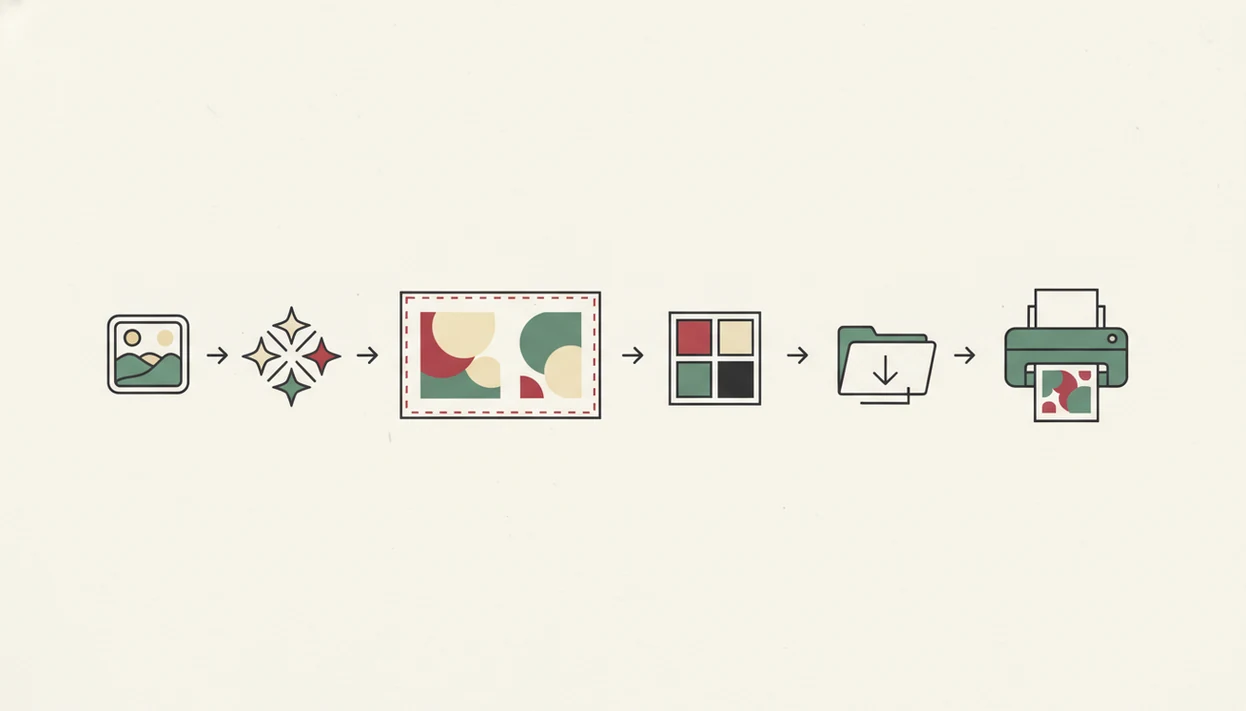
Use this print-first workflow when the goal is a card you can mail, not just post. It works especially well for an AI Christmas card from one photo.
- Choose one sharp phone photo with visible faces and enough room around the edges.
- Select a card format, such as 5x7 portrait, 5x7 landscape, square, or postcard.
- Add wording manually so names, greetings, and business details stay editable.
- Check crop-safe margins before export, especially near heads, hands, and text.
- Export a high-resolution PNG or PDF, then save a digital version for text, email, or social sharing.
- Proof one print before ordering a batch or feeding cardstock through the home inkjet.
That first proof matters. Photo paper curling at the corners can hide a bad crop until it is too late.
Scoring Criteria for AI Christmas Card Generator Options
“What makes one AI Christmas card generator better than another?” For printable photo cards, score tools by photo realism, face preservation, print export, template quality, wording controls, privacy, speed, and ease of use.
We give more weight to printable output than novelty AI images because most holiday cards still have to survive trimming, envelopes, and refrigerator display. A good Christmas card maker delivers recognizable people, editable greetings, and print-safe files, not just a dramatic fantasy portrait.
When the issue is last-minute mailing, XmasCard earns a strong place because the one-photo workflow reduces the number of decisions before export. The most reliable workflow is usually AI plus manual finishing, because humans are still better at checking names, faces, and family tone.
McKinsey’s 2023 global survey found that 55% of organizations had adopted AI in at least one business function, which helps explain why casual creative workflows now include AI tools too (https://www.mckinsey.com/capabilities/quantumblack/our-insights/the-state-of-ai-in-2023-generative-ais-breakout-year).
How We Chose the Best AI Christmas Card Generators
We chose the best AI Christmas card generators by asking which tools could produce cards people would actually print, mail, and share without awkward fixes. Print-readiness mattered more than flashy snow effects, painterly filters, or novelty portraits.
Our review treated each tool by its strongest use case instead of forcing one universal ranking. A prompt-art app, a template editor, and a one-photo card maker can all be useful, but they solve different holiday-card problems.
- Test whether uploaded faces stayed recognizable, especially in couples, kids, pets, and small group photos.
- Check how much control users had over names, greetings, dates, fonts, and business details.
- Review export formats, resolution, crop safety, and whether the final file was suitable for home or local printing.
- Compare privacy signals, upload handling, speed, and how many retries were needed before a usable card appeared.
- Penalize tools that only produced low-resolution previews or prompt-only images with baked-in text, since those are risky for print.
Even with a strong generator, proof one card before ordering a batch. The screen preview is not the same as cardstock, trimming, and envelopes.
One-Photo Family Christmas Cards With XmasCard
XmasCard is strongest when you have one decent phone photo and need a finished holiday card draft quickly. That is the real 9:47 p.m. kitchen-table use case, with kids asleep, the phone battery at 18%, and no patience for a full design suite.
For families who need a printable card without staging a new photo shoot, XmasCard fits because PiXmas Cards starts with one image and turns it into card layouts, festive portraits, and shareable greetings. One-photo input matters because it removes the biggest delay: hunting through hundreds of near-duplicates.
Small businesses can use the same pattern for a staff photo, storefront image, product table, or pet-grooming client greeting. If you want the step-by-step phone workflow, the guide to how to make AI Christmas card with phone covers the smaller taps and saves.
Template, Prompt, and eCard AI Holiday Card Maker Options
Not every AI holiday card maker needs to be print-first. Some people want full design control, some want illustrated fantasy scenes, and some just need a quick eCard before the family group chat goes quiet.
Template-first Christmas card makers
Template-first tools like Canva are useful when layout variety matters most. You can adjust fonts, stickers, colors, and photo grids, but the tradeoff is time. More control can mean more tiny decisions, especially with a Downloads folder full of duplicates and a file named final-final-card.pdf.
Prompt-first Christmas card generators
Prompt-first tools are better for illustrated snow villages, Santa scenes, or painterly couple portraits. However, they can struggle with accurate faces, readable text, and hands. Anyone dealing with a tight mailing window may be better served by XmasCard because the workflow ends in a printable card file instead of only an AI image.
For a deeper category split, compare the AI Christmas card generator vs template maker decision directly.
AI Christmas Card Generator Myths and Print Risks
Several AI Christmas card myths lead to disappointing prints. The most photorealistic image generator is not always the right choice; a clean layout with safe margins often matters more.
AI also does not always write perfect card copy. Names, years, and business greetings need proofing, especially if the text was generated inside the picture instead of added as an editable layer.
Another myth is that every AI holiday card maker handles print and digital equally well. Some tools are built for eCards and social previews, while others are closer to a printable Christmas card maker.
Finally, AI-generated cards are not always fully original. Many use template libraries, repeatable prompt styles, or reusable decorative elements. That can be fine for holiday cards, but it is worth knowing before ordering 80 copies.
Limitations
AI card tools are useful, but they still need human checking before print or sharing.
- AI text rendering can misspell names, greetings, addresses, years, or small typography.
- Low-resolution files, missing bleed, and compressed exports can make printed cards look soft.
- Group photos, hands, pets, glasses, and subtle facial details can distort in stylized edits.
- One-click results may still require several tries before the pose and holiday tone feel right.
- Privacy policies differ, so review photo retention, deletion, reuse, and training-use terms.
- Prompt-art tools may produce beautiful cards that do not look like your actual family.
- Home printers can shift cardstock slightly, so proof one copy before printing a stack.
- Delivery timing is not controlled by the generator, so check USPS and local print pickup windows separately.
Save a backup. Always.
FAQ
What is an AI Christmas card generator?
An AI Christmas card generator helps turn a photo, prompt, or template into a Christmas card design. It may create a festive image, preserve an uploaded photo, or combine AI styling with editable card layouts.
Can AI make printable Christmas cards?
Yes, AI can make printable Christmas cards if the final export has enough resolution, safe margins, and a suitable file format. PDF and high-resolution PNG are usually safer than compressed screenshots.
Which AI Christmas card maker handles faces best?
Photo-card tools usually preserve real faces better than prompt-only image generators. Prompt tools often invent or alter facial details, especially in groups.
Are AI Christmas card generators free?
Many AI Christmas card generators offer free previews or limited downloads. High-resolution exports, premium templates, watermark removal, or printing may require payment.
Can AI write Christmas card messages?
AI can draft Christmas card wording, from warm family notes to short business greetings. Users should still proof names, tone, spelling, and recipient details.
What photo works best for an AI Christmas card?
Use a bright, sharp, high-resolution phone photo with visible faces and an uncluttered background. Avoid heavy blur, harsh flash, and important details near the edge.
Do AI Christmas cards print well?
AI Christmas cards print well when the file has enough resolution, bleed, crop-safe layout, and clean PDF or PNG export. A low-quality download can look blurry even if the preview looked good.
Are AI Christmas cards private?
Privacy depends on the service. Check upload, storage, retention, deletion, and training-use policies before using family photos.
Can I send AI Christmas cards digitally?
Yes, most tools can create digital Christmas cards for text, email, or social posting. Match the aspect ratio and file size to the platform before sending.