
Family Christmas Card Results From One Photo: Realistic Examples
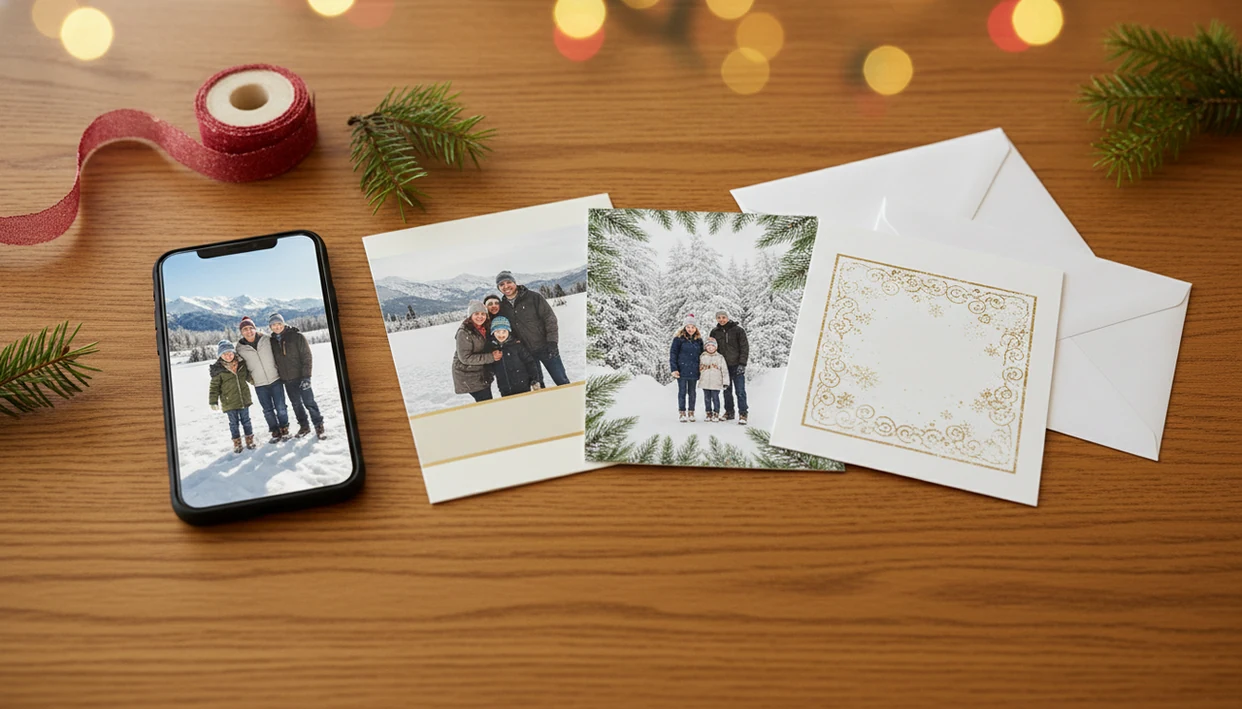
Family Christmas card results from one photo can look polished, festive, and print-ready when the original image is sharp, well lit, and shows each face clearly. The strongest examples usually start with one casual phone photo, then turn it into a snowy portrait, cozy card layout, illustrated greeting, or simple printable design before you choose the final card.
> Definition: XmasCard is a Christmas card app that turns one photo into printable Christmas cards and holiday greetings for families, couples, and small businesses.
- A one photo family card works best when the source image has clear faces, good lighting, and enough space around the family for text and cropping.
- Realistic results include AI portrait looks, classic flat cards, illustrated family card examples, square digital greetings, and printable vertical or horizontal layouts.
- One-photo cards are convenient, but they can still distort faces, over-style the scene, or need separate exports for print, social, and text-message sharing.
At-a-glance family Christmas card results from one photo
Family Christmas card results from one photo can become a finished holiday card, AI portrait, printable layout, or digital greeting if the original image gives the tool enough clean information. The result depends most on lighting, face visibility, framing, style strength, and aspect ratio.
A sharp phone photo with space above heads is much easier to crop than a tight selfie under ceiling glare. We’ve seen one late-night holiday card draft fall apart because “Merry Christmas” covered a child’s forehead in the 5x7 preview.
| Result type | Works well when | Watch for |
|---|---|---|
| Classic photo card | Faces are clear and centered | Text crowding near heads |
| Snowy AI portrait | Background is plain and faces are sharp | Changed hair, coats, or smiles |
| Illustrated card | You want a softer, drawn look | Reduced likeness |
| Social greeting | Photo is usable but not print-sharp | Small text on phones |
For most families, one clear phone photo is often easier than scheduling a new photo session because the card can be built around a real moment they already have.
One-photo Christmas card workflow for family images
A one-photo Christmas card workflow turns one uploaded family image into a greeting by detecting faces and composition, applying a holiday style or layout, adding text, and exporting a finished file. In AI terms, the system reads image embeddings, which means it maps visual details like faces, pose, background, and objects into patterns it can edit.
The tool may change the background, soften lighting, add snow, adjust outfits, or create an illustration style while trying to preserve family likeness. That’s the “how it works” part, not magic restoration. A blurry toddler face stays a problem.
Pew Research Center reported that 52% of U.S. adults said they have used ChatGPT in 2024, which helps explain why AI-assisted card workflows now feel familiar to many households source. Tools like XmasCard, Canva, and Picsart fit this broader shift, but the source photo still sets the ceiling.
One-photo family card example checklist
Use this one-photo family card checklist when you want a result that can survive both a phone preview and a printed proof. First pick the photo, then choose the format, then check the crop.
- Choose a sharp source photo with visible faces, decent light, and extra space around heads and shoulders.
- Select a card format such as horizontal 5x7, vertical portrait, square social post, or text-message greeting.
- Test two or three styles before deciding between cozy, snowy, illustrated, or simple photo-card results.
- Compare face accuracy at full size, especially eyes, teeth, glasses, hairlines, and toddlers looking sideways.
- Adjust the wording so it does not cover faces, pets, or the main family shape.
- Export separate versions for print, social posts, email, and text messages if each channel needs a different crop.
A useful Christmas card maker should preserve face likeness, show a print preview, and let you export separate crops for print, social posts, email, and texting. It should not promise that every weak photo becomes print-shop quality.
Evaluation method for one-photo family card examples
Judge one-photo family card examples by likeness, holiday styling, text readability, print readiness, and format fit. A pretty preview is not enough if Grandma’s glasses turn into a smudge or the final PDF cuts off the dog.
- Likeness: Faces should still look like the real people, not vaguely related holiday characters.
- Holiday styling: Snow, lights, garland, or illustration effects should support the photo, not bury it.
- Text readability: Short wording should remain readable on a phone and in a 5x7 print.
- Print readiness: The file needs enough resolution, safe margins, and a crop that leaves room for trimming.
- Format fit: Horizontal photos often fit classic cards, while vertical photos work better for portrait layouts.
Adobe reported that Firefly users generated more than 7 billion images, showing that photo-based creative generation is now mainstream source. Even so, multiple generations are normal. Save a backup before you overwrite final-final-card.pdf.
Family card example: casual sofa photo to cozy Christmas card
A casual sofa photo can become a warm printable Christmas card when the family faces the camera and window light keeps skin tones natural. The most believable result usually keeps familiar clothing, natural expressions, and the original family grouping.
The likely output is a horizontal card with warm lights, soft garland, a muted background, and simple “Merry Christmas” wording. A wrinkled holiday sweater on a chair back might even stay in the scene if it feels honest. That can be better than sanding every detail smooth.
The fixes are practical. Remove obvious clutter, move text away from faces, and check whether shadows make one side of the card too dark. Cropped hands can look odd after styling, so zoom out before export if the app allows it. Parents comparing workflows may also want a Christmas card app for parents that keeps the process short after bedtime.
Family card example: backyard phone photo to snowy AI portrait
A backyard or park photo with clear faces can turn into a snowy AI portrait even when the original background is plain grass, fence, or late-fall trees. This is where one-photo results can look more dramatic.
The likely output adds snow, evergreen trees, warm coats, golden window light, or a studio-style holiday backdrop. A couple photo with soft bokeh lights behind it can feel polished fast, especially when the original pose is already calm and centered.
But stronger style settings carry more risk. Clothing may change, hair can look too smooth, and smiles may shift by a small but noticeable amount. Choose a lighter style strength if the family must look exactly like the original photo. For couples using the same one-photo idea, a couple Christmas card app often uses the same crop logic with fewer faces to preserve.
Family card example: imperfect phone photo to simple digital greeting
Does an imperfect phone photo still work for a family Christmas card? Yes, but it usually works better as a simple digital greeting than as a large printed card.
Think dim living-room lighting, mild blur, a tight crop, or one child moving just as the shutter fires. Yellow light can be corrected a little, but it cannot always rebuild sharp eyes or clean edges. The card preview may look fine on a phone, then feel soft when enlarged.
A square social post, email card, small photo layout, or text-message greeting is often the safer choice. Use a festive border, short wording, and less aggressive AI transformation. A social post preview on a phone hides flaws better than fresh cardstock warm from the printer. For true deadline pressure, a last minute Christmas card maker should still let you check the crop before sending.
Common one-photo Christmas card patterns for family photos
The most reliable family card examples repeat the same patterns: clear faces, a centered family, an uncluttered background, moderate holiday style, and short readable wording. The card looks finished because the basics are easy to read.
- Clear-face classic: Everyone faces forward, making it the safest choice for print.
- Centered-family layout: The family sits in the middle, leaving margins for greeting text.
- Soft-background edit: The background gets lights, snow, or blur without changing the people too much.
- Illustrated family card: The image becomes cartoon, watercolor, or storybook style, with some likeness tradeoff.
- Square greeting: The crop fits social sharing, tablets, and text threads.
Horizontal photos often suit classic cards, vertical photos suit portrait cards, and square crops suit social sharing. The U.S. Census Bureau’s 2023 American Community Survey table S2801 reported that 81.0% of U.S. households had a computer and 73.4% had broadband internet, which helps explain why these home card workflows are common source. Pet-heavy cards may need a dedicated pet Christmas card maker.
Hidden tradeoffs in one-photo family card galleries
One-photo family card galleries often show the polished result, not the rejected generations, prompt edits, source-photo problems, or print-format changes behind it. The first output is not always the final output.
That matters when you are working at 9:47 p.m. at the kitchen table, the kids are asleep, and the phone battery is at 18%. A gallery might show one snowy portrait, but not the two versions where a hand looked strange or the dog leash stayed in the corner.
Digital previews can also hide low resolution, cramped text, and trim problems. One design may not work equally well for 5x7 prints, Instagram, email, and text messages. Exporting separate files is not fussy. It’s how you avoid sending a card that looked fine in the app but prints with the greeting pressed against the edge.
Limitations
One-photo Christmas cards can save time, but they still depend on the original photo and the export format. Check these limits before you treat a preview as finished.
- Blurry, dark, heavily cropped, or backlit photos can produce weak results.
- AI can alter faces, teeth, eyes, hair, hands, body proportions, outfits, or background details.
- Overly strong styles can make the card look less like the real family.
- Print requires enough resolution, safe margins, and readable text at the final size.
- Separate layouts may be needed for print, social, email, and text-message sharing.
- Pets, toddlers, glasses, and partial faces can be harder to preserve accurately.
- Tight crops leave little room for names, greetings, dates, or a festive border.
- A home inkjet tray can pull cardstock slightly crooked, so leave extra margin if printing at home.
For a one photo family card, simple styling usually works best when likeness matters more than a dramatic scene.
FAQ
Can I make a family Christmas card from just one photo?
Yes. One clear family photo can be enough for a finished Christmas card if the faces are visible and the image has room for cropping and text.
What kind of photo works best for a one-photo Christmas card?
Use a sharp, bright photo with uncropped heads, visible faces, and some background space. Natural window light usually works better than a dark flash photo.
Will everyone’s face still look accurate in the card?
Likeness can be preserved, but it is not guaranteed. Weak photos and strong AI styles are more likely to change facial details.
Can I print a Christmas card made from one photo?
Yes, if the exported file has enough resolution, safe margins, and readable text for the print size. Always check the printable version before ordering or using a kiosk.
Which layout is best for a one-photo family Christmas card?
Horizontal layouts often work for 5x7 printed cards, vertical layouts fit portrait photos, and square layouts work well for social posts. Choose the layout that matches the original photo shape.
Can I include pets in a one-photo family Christmas card?
Yes, pets can work if they are clearly visible and not blurred. AI styles may simplify fur, eyes, antlers, collars, or partial pet faces.
What wording should I put on a one-photo Christmas card?
Use short wording such as “Merry Christmas,” “Happy Holidays,” or “With love from the Martins.” Short lines protect face space and stay readable in small digital formats.
How many tries does it usually take to get a good result?
Several variations or prompt edits are normal before the final card looks right. Generate options, then review faces, crop, and wording before you export.